![ICG_LOGO_BLACK.png]](https://info.insightcosmetics.com/hs-fs/hubfs/Logos/ICG_LOGO_BLACK.png?height=40&name=ICG_LOGO_BLACK.png)
How do I log in to my account?
To log in to your account:
- Go to the login page.
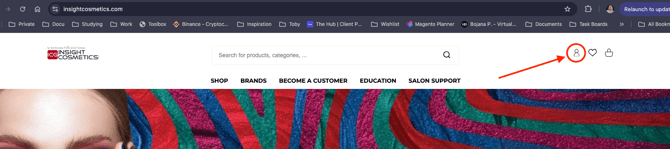
- Enter your email address and password.
- Press Sign in.
If you had an account on our previous website, you need to reset your password before logging in to the new website for the first time, as your old password will not work here.
Please note that your account only exists on the country website where it was created. For example, if you are registered on the Danish website, you will not be able to log in on the global website with the same account.
How do I reset my password?
If you forgot your password, follow these steps:
- Go to the login page.
- Press Forgot your password?
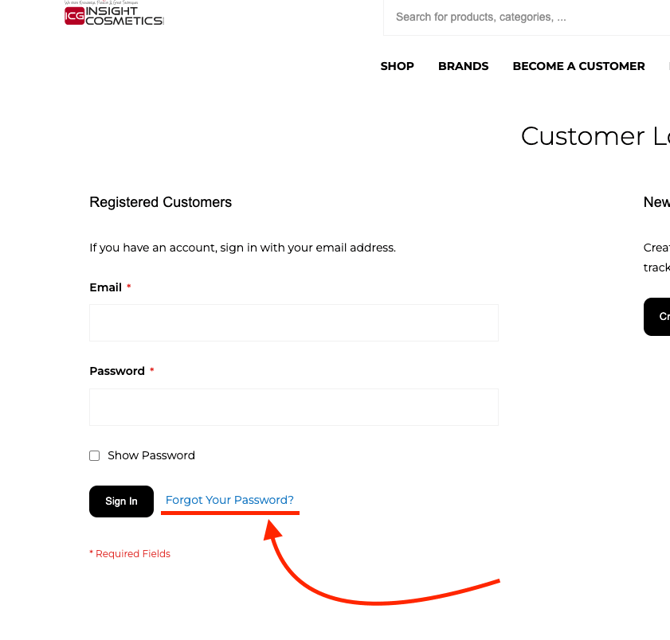
- Enter the email address linked to your account.
- Press Reset password.
- Open the email with the reset link.
- Create your new password.
- Go back to the login page and sign in again.
The reset password email should arrive within a few minutes. Please use the link as soon as you receive it. Do not wait too long, as the reset link is only active for a limited time.
I did not receive the password reset email
Please check the following first:
- Your spam or junk folder.
- Any other filtered folders in your inbox.
- Whether you entered the correct email address.
- Whether you are trying to reset the password on the correct country website.
If you requested the reset email twice and still did not receive anything after checking all folders, your email address is most likely not registered in that website’s system.
My reset link does not work
The reset link is only active for a limited time. If the link has expired, please request a new one and open it right after receiving it.
I am sure my password is correct, but I still cannot log in
Please check the following:
- Make sure you are using the correct email address.
- Make sure you are trying to log in on the correct country website.
- Check for typing mistakes in your password.
- Request a new password and try again.
- Try another browser or clear your browser cache.
I no longer have access to my email address
If you no longer use the email linked to your account, please contact our support team and include:
- Your full name
- Your old email address
- Your new email address
- Any order details which help us identify your account
Still having trouble?
If you still have trouble logging in or resetting your password, please contact our support team:
- Call us under (DK) +45 3332 3322 | (DE) +49 (0) 221 920 490 | (AT) +43 (0) 720 881 062 | (CH) +41 (0) 415 880 432 | (SE) 08-40 83 82 33 | (FI) 09 31579233
- Write us an email to info@icgroup.dk.
- Become part of our Facebook Pro Team Groups where hundereds of colleagues share their knowledge.
When contacting us, please include your full name, email address, the website you are trying to log in to, and a short description of the issue.